We needed data moving from MySQL to Postgres continuously — not once a night, not on a cron job that quietly falls behind. That's the whole pitch of CDC, change data capture: read the database's binlog directly and stream every insert, update, and delete the moment it happens, instead of polling for what changed.
There are three well-worn ways to do this. We tried all three on for size, picked Airbyte, and this post is what we learned along the way — why we picked it, how it's actually built under the hood, how we set it up, and an OOM-killed job that took a Saturday afternoon to run down.
Three ways to do CDC
All three read the same binlog underneath. The difference is how much of the machinery you're signing up to run yourself.
We didn't need Kafka's replay or fan-out — one source, one destination, kept in sync. That ruled out Debezium on complexity alone, and left Airbyte vs. DMS, which came down to cost and how much operational work we wanted to own.
Airbyte vs AWS DMS: what it actually costs
Self-hosted Airbyte is the cheaper line item, but that number doesn't include your own time — you're the one patching the box, watching disk space, and rebuilding it if it falls over. DMS costs roughly 40–50% more for a comparable single-instance setup, and that gap is what buys back all of that: AWS handles the patching, the monitoring, and multi-AZ failover if you want it, without any of it landing on your plate.
We went with Airbyte anyway. We had the bandwidth to babysit one small EC2 box, and we wanted the UI-driven, multi-connector flexibility beyond just this one MySQL-to-Postgres pipeline — DMS is great at exactly one thing, and we wanted more than one thing.
How Airbyte actually works
Airbyte splits cleanly into two halves: the platform and the connectors. The platform handles scheduling, configuration, and orchestration. Connectors are the pieces that actually read from a source or write to a destination — and they're nothing more than Docker images, which is what makes the whole thing so easy to extend.
A few platform components are worth knowing by name, because they're what shows up in logs and pod names the moment something breaks:
- Config API Server — the UI and API you actually touch. Every source, destination, and connection goes through here.
- Database (Config & Jobs) — a Postgres instance holding all configuration and job history.
- Temporal — schedules and sequences sync workflows, including your cron.
- Worker— pulls jobs off Temporal's queue and calls the Workload API to run them.
- Workload API — the interface for enqueuing one sync run.
- Launcher — takes a workload and spins up the pod that actually runs it.
- Cron — cleans up logs, refreshes connector definitions, sweeps old workloads.
- Bootloader — runs database migrations and checks the environment on startup.
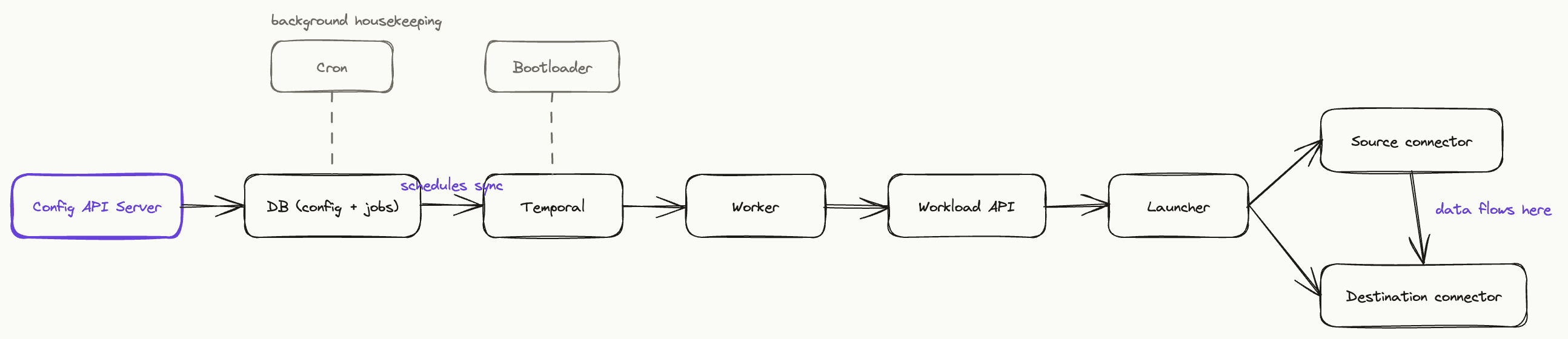
So a sync run looks like this end to end: Temporal fires the schedule, the Worker picks it up, the Workload API enqueues it, and the Launcher starts a pod running your source and destination connector images side by side. Data flows straight from one to the other. Once the sync finishes, the pod disappears — nothing sits around burning resources between runs.
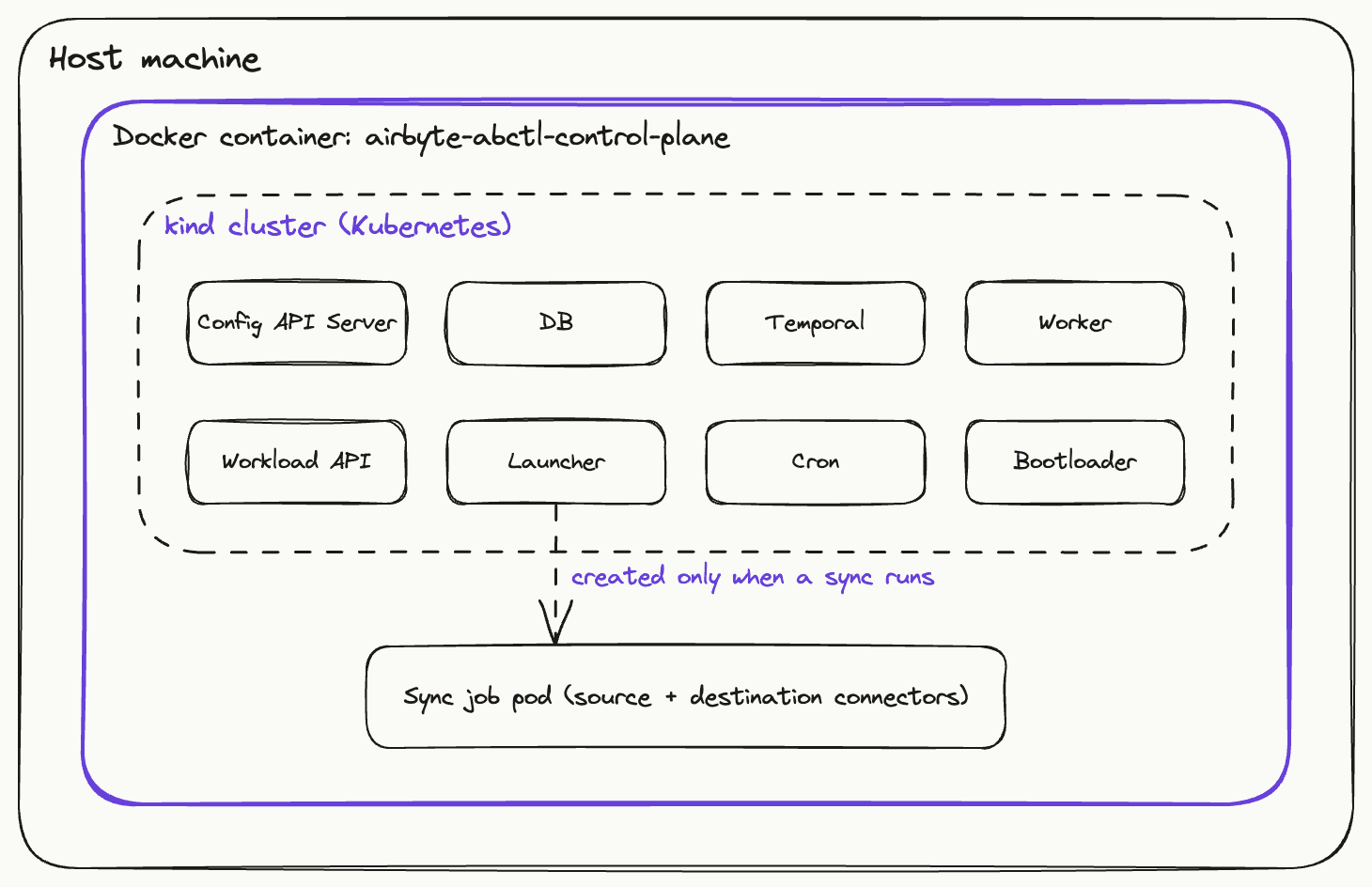
Architecture: inside Docker, and in general
One more diagram is worth having, because it answers a different question than the one above: not “how do the services talk to each other,” but “what is actually running on my machine when I install this.”
abctldoesn't just run Airbyte as a pile of Docker containers — it spins up a real Kubernetes cluster (via kind, Kubernetes-in-Docker) inside a single Docker container on your machine, usually named airbyte-abctl-control-plane. Every platform service runs as a pod inside that cluster. When a sync fires, the Launcher creates a fresh pod just for that job, running the source and destination connector images, and tears it down the moment the sync finishes.
Installing Airbyte
We ran this on a plain Ubuntu EC2 box. Docker first, then abctl, then Airbyte itself.
1. Install Docker
sudo apt update
sudo apt upgrade -y
sudo apt install apt-transport-https ca-certificates curl software-properties-common

curl -fsSL https://download.docker.com/linux/ubuntu/gpg | sudo apt-key add -
sudo add-apt-repository "deb [arch=amd64] https://download.docker.com/linux/ubuntu focal stable"

apt-cache policy docker-ce
sudo apt install docker-ce
sudo systemctl status docker
sudo usermod -aG docker ${USER}
2. Install abctl
abctlis Airbyte's own CLI for installing and managing a local instance.
curl -LsfS https://get.airbyte.com | bash -
3. Install Airbyte
abctl local install
Two flags worth knowing:
abctl local install --insecure-cookies— if you're testing over plain HTTP.abctl local install --values values.yaml --insecure-cookies— to pass a customvalues.yaml, which is how you fix the OOM issue further down.
To uninstall later:
abctl local uninstall --persisted
rm -rf ~/.airbyte/abctl
Setting up MySQL → Postgres
Once Airbyte's UI is up, the flow is: create a source, create a destination, then connect them.
- Source (MySQL): enter host, port, database, and credentials. For replication method, pick CDC — Airbyte reads the binlog directly instead of polling with queries.
- Destination (Postgres): same idea — host, port, database, credentials.
- Connection: pick the source and destination you just created, choose which tables/streams to sync, and set a schedule.
A couple of things that aren't obvious the first time through:
- Sync mode and cursor:for CDC streams, Airbyte tracks position using the binlog itself — there's no manual cursor field to pick like a plain incremental sync. What you do need is a primary key per stream, so Airbyte can dedupe updates correctly (usually “Incremental | Append + Deduped”).
- Schedule: a cron expression or a fixed interval. We run ours every few minutes — CDC over binlog means changes show up close to real time, so a tight schedule is genuinely earning its keep here, not just wasted polling.
Point the source at the RDS writer endpoint, not the reader endpoint. Read replicas don't have binlog enabled, so CDC can't work against them — Airbyte simply won't see any changes if you point it at a reader.
Debugging an OOM-killed sync job
A while after setup, one of our larger tables started failing mid-sync. The job just died partway through, with nothing useful in the UI to explain why. Here's how we ran it down.
Getting into the cluster
abctl runs Airbyte inside a kind cluster, which itself runs inside one Docker container. To look around, you get into that container first, then use kubectl as normal:
# get into the control-plane container
docker exec -it airbyte-abctl-control-plane bash

# list every pod, across namespaces
kubectl get pods -A
The failing job shows up as a pod in Error or OOMKilled status. Describe it to confirm:
kubectl describe pod <pod-name> -n airbyte-abctl
Seeing Reason: OOMKilled and exit code 137 in the events settles it — the container was killed for exceeding its memory limit, not because of a connector bug.
Why it happens
Airbyte's default job containers get a fairly small memory limit. Fine for small tables — but an initial CDC snapshot on a large table, or one with wide rows, can blow straight past it.
Fixing it with values.yaml
The fix is giving job containers more room, both at the Kubernetes resource level and through Airbyte's own env vars:
global:
  jobs:
    resources:
      requests:
        memory: "2Gi"
        cpu: "1"
      limits:
        memory: "12Gi"
        cpu: "2"

    # This section is critical — it forces the source/destination
    # containers themselves to use the higher limits above.
    env_vars:
      JOB_MAIN_CONTAINER_MEMORY_REQUEST: "2Gi"
      JOB_MAIN_CONTAINER_MEMORY_LIMIT: "12Gi"
Then reinstall with that file:
abctl local install --values values.yaml --insecure-cookies
The resources block controls the Kubernetes-level limit on the job pod. The env_varsblock is what actually raises the ceiling inside the source and destination containers themselves — skip it, and the pod-level increase doesn't fully carry through, so you'll still see it get killed. After this change, the same large-table sync went through clean.
Airbyte isn't the fastest option on the table, and it isn't the most flexible one either — Debezium and Kafka beat it on both, if you actually need what they offer. But for one MySQL-to-Postgres pipeline run by a small team, it landed in the right spot: near real-time sync off the binlog, a UI simple enough to stand up in an afternoon, and open source, so we're not paying per byte replicated. The OOM job was the only real bump in the road, and it came down to one config file once we knew where to look.
If you're working on something similar or have questions about the setup, I'm happy to talk more. Feel free to reach out.